Immi Rank
# ImmiRank SkillSelect EOI calculator and pool visualizer for Australian skilled migration visas (189 / 190 / 491). Enter your profile, get your EOI score live, and see where you rank in the current SkillSelect pool.
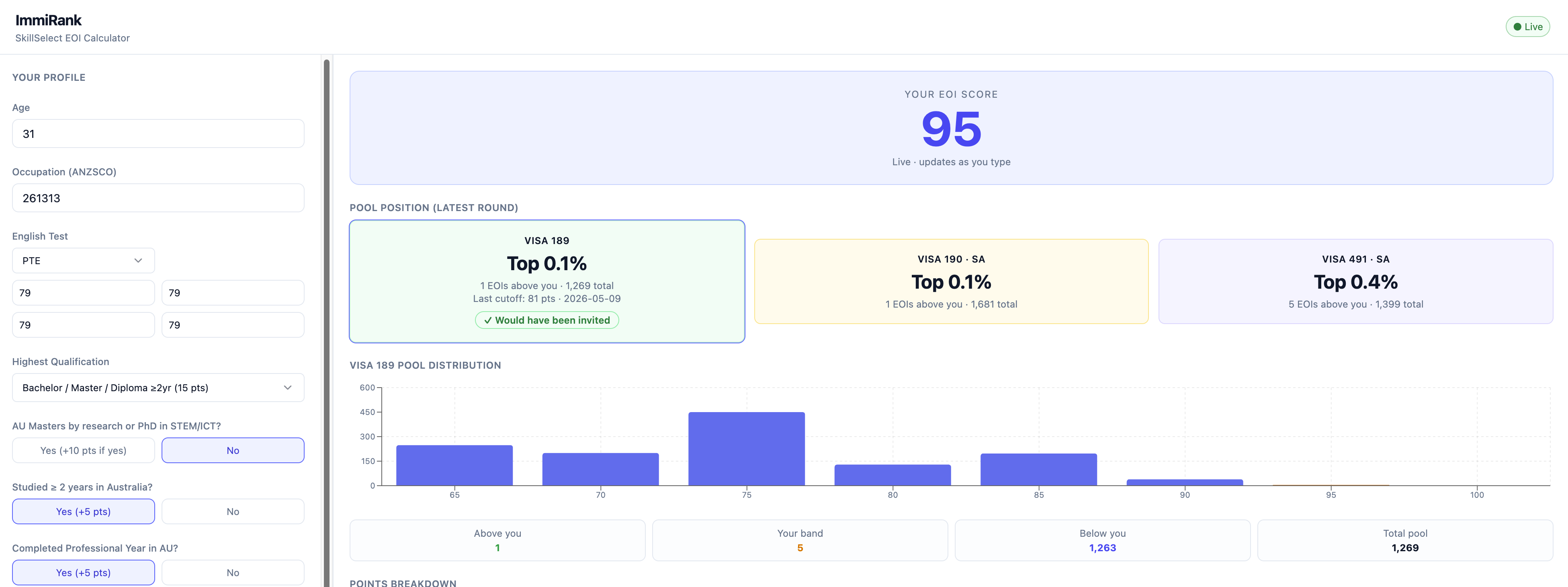
About the project
Architecture Overview
Rendering diagram…
Data Flow
Rendering diagram…
Project Structure
Rendering diagram…
Where Does the Data Come From?
ImmiRank sources immigration data from two places:
1. SkillSelect EOI Pool Data (automated + manual)
The primary data source is the Australian Department of Employment's Qlik dashboard:
https://api.dynamic.reports.employment.gov.au/anonap/extensions/
  hSKLS02_SkillSelect_EOI_Data/hSKLS02_SkillSelect_EOI_Data.html
The Qlik dashboard has 4 sheets:
| Sheet | Name | Purpose |
|---|---|---|
| 1 | Dashboard Overview | Landing page with data currency info |
| 2 | EOI Parameters | Month selection, visa type filters, column toggles |
| 3 | Results Table | The actual data table (exportable) |
| 4 | Help and How To's | Export instructions, field glossary |
SkillSelectScraperJob runs via Playwright (headless Chromium) and:
- Navigates to the EOI Parameters sheet (click
Next) - Toggles Occupations and Points as additional columns
- Navigates to the Results Table sheet (click
Next) - Right-clicks the table → "Export data" → downloads a CSV
CsvParserextracts from each row:- Visa type (
189PTS→189,190SAS→190,491FSR/491SNR→491) - ANZSCO code (first 6 digits from "261313 Software Engineer")
- Points score band (65, 70, 75, ...)
- EOI count (
<20values are approximated as 10)
- Visa type (
- Upserts an
EoiRoundandPoolSnapshotrows into PostgreSQL
Schedule: Runs automatically on the 1st of each month via Hangfire cron job.
Manual trigger:
curl -X POST http://localhost:5001/admin/scrape
Monitor progress at http://localhost:5001/hangfire.
2. ANZSCO Occupation List (seeded)
Occupation codes and titles come from the Department of Home Affairs (DOHA) skilled occupation lists:
- MLTSSL (Medium and Long-term Strategic Skills List) - eligible for visa 189
- STSOL (Short-term Skilled Occupation List) - eligible for visa 190/491
Seed 116 common occupations + index into Elasticsearch for autocomplete:
curl -X POST http://localhost:5001/admin/seed-occupations
3. Sample Pool Data (for development)
Seed realistic sample pool distributions for all occupations:
curl -X POST http://localhost:5001/admin/seed-pool
This creates score band distributions (65--100 pts) across all visa types and states, plus invitation round cutoff data. Use this to test the app before the real scraper runs.
3. Score Calculation (built-in logic)
The EOI points calculation in EoiScoreCalculator.cs implements the official DoHA points table:
| Category | Max Points |
|---|---|
| Age | 30 |
| English (PTE/IELTS) | 20 |
| Education | 20 |
| Specialist Education (STEM/ICT) | 10 |
| Australian Study (2+ years) | 5 |
| Professional Year | 5 |
| NAATI CCL | 5 |
| Work Experience (overseas + AU, capped) | 20 |
| Partner Status | 10 |
Tech Stack
| Layer | Technology |
|---|---|
| Frontend | React 19 + TypeScript + Vite + Tailwind CSS 4 + shadcn/ui + Recharts |
| Real-time | SignalR (live score recalculation on every profile change) |
| Backend | ASP.NET Core (.NET 8) |
| Scraper | Playwright (headless Chromium) + Hangfire (monthly cron on 1st) |
| Database | PostgreSQL 16 (EF Core + snake_case conventions) |
| Cache | Redis 7 (24h TTL for pool data, 1h for round IDs) |
| Search | Elasticsearch 8.13 (ANZSCO occupation autocomplete) |
Database Schema
Rendering diagram…
Prerequisites
Getting Started
1. Start infrastructure
docker compose up -d
Wait ~15 seconds for Elasticsearch, then verify:
curl -s http://localhost:9200/_cluster/health | grep status
# Expected: "status":"green" or "status":"yellow"
2. Run database migrations
The compose setup creates the database automatically (immirank / immirank / immirank).
If reusing an old Postgres volume where the immirank role doesn't exist, create it manually:
docker exec -it immi-rank-postgres-1 psql -U immirank -d immirank
Apply migrations:
cd backend
dotnet ef database update --project src/ImmiRank.Data --startup-project src/ImmiRank.Api
3. Start the backend
cd backend
dotnet run --project src/ImmiRank.Api
- API:
http://localhost:5001 - Hangfire dashboard:
http://localhost:5001/hangfire - Swagger:
http://localhost:5001/swagger
4. Start the frontend
cd frontend
npm install
npm run dev
- App:
http://localhost:5173
API Endpoints
| Method | Path | Description |
|---|---|---|
GET | /api/pool/{visaType}/{anzscoCode}?userScore=X&state=Y | Get pool rank and distribution |
GET | /api/occupations?q=query | Search ANZSCO occupations |
POST | /admin/scrape | Trigger Qlik dashboard scrape (Hangfire background job) |
POST | /admin/seed-occupations | Seed 116 ANZSCO occupations + index into Elasticsearch |
POST | /admin/seed-pool | Seed sample pool data for development |
| WebSocket | /hubs/eoi-score | SignalR hub for live score updates |
Running Tests
cd backend
dotnet test tests/ImmiRank.Tests
Covers: score calculation (age, English, education, work experience, partner), pool ranking (percentile, invitation likelihood), and CSV parsing (visa type mapping, ANZSCO extraction, <20 handling).
Updating the Scraper
If the Qlik dashboard changes its layout or selectors, run the discovery script to inspect the current DOM:
cd scripts
npm install
npx playwright install chromium
node discover-qlik.mjs
This opens a visible browser, navigates through all sheets, takes screenshots, and dumps every interactive element to scripts/discovery/. Use the output to update selectors in SkillSelectScraperJob.cs.
Post-MVP Notes
- Nominated State column -- the Qlik dashboard limits additional columns to 2. Currently we use Occupations + Points. To get per-state breakdowns for 190/491, a second scrape pass with Nominated State + Points would be needed.
- Regional study bonus -- not implemented (unverified against the official 189 points table).
- Filter pane selectors -- the scraper attempts to filter visa types on the Parameters page, but the Qlik filter pane selectors may need tuning after a live test run.